The 5-Minute Hotel AI Visibility Check
Search Engine Land asked ChatGPT for "best hotels in NYC" sixty-eight times. Baccarat Hotel, a five-star property a block from MoMA with consistent five-star reviews and the kind of brand recognition that should be a layup, appeared in 1.5% of answers. Once across sixty-eight runs.
The hotel does nothing wrong on the human side. It is under-evidenced on the AI side, and so are most of its competitors: beautiful, well-reviewed, commercially strong properties whose evidence base is invisible to the systems guests now ask first.
This is a commercial integrity problem dressed up as a technical one. AI is going to describe your hotel to a guest with or without your help. Either it uses your evidence or it guesses from stale third-party fragments.
You can find out where you sit in five minutes. No tooling, no analytics dashboard, just a five-step hotel AI visibility check any hotelier can run in a coffee break. Each step isolates a separate failure mode in the AI recommendation pipeline. Score yourself out of five at the end.
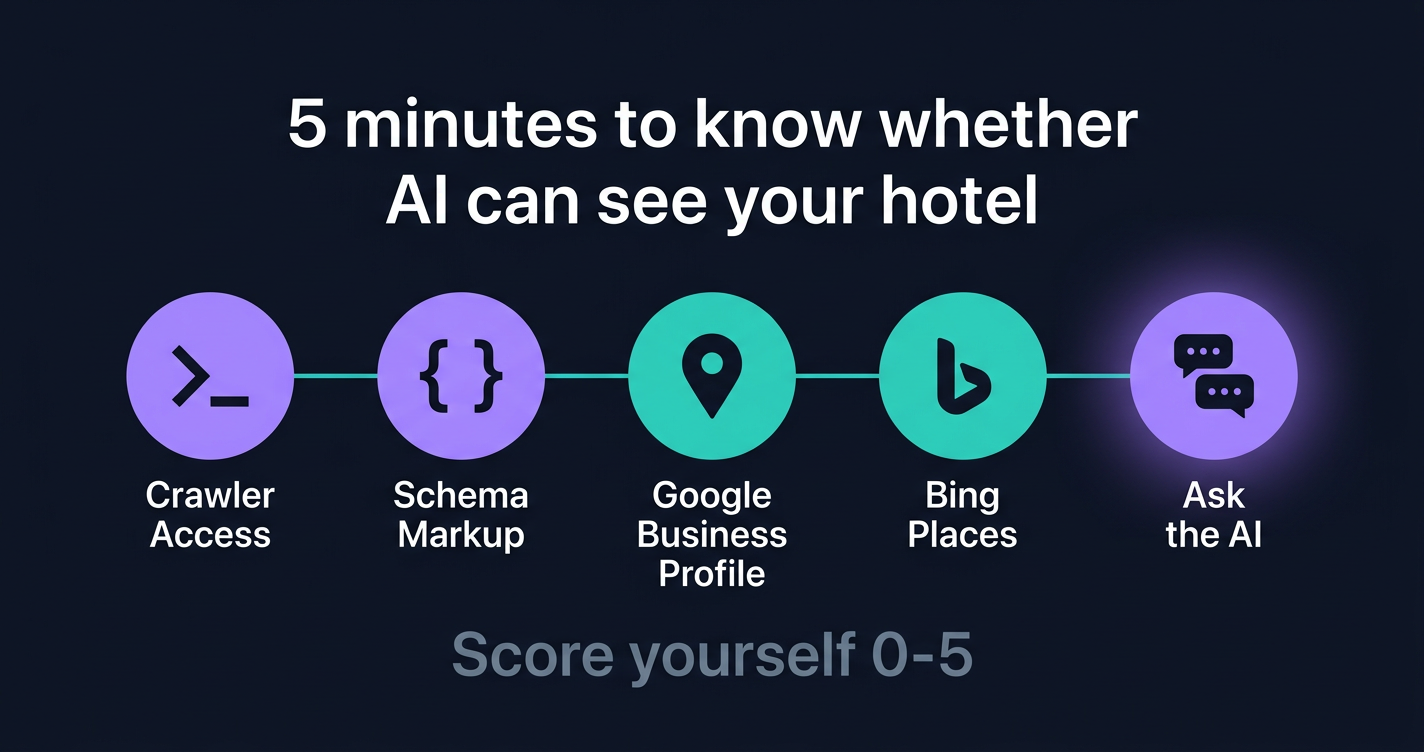
Why a 5-Minute Hotel AI Visibility Check Works
For a quick diagnostic, five surfaces catch most of the obvious failure modes: crawler access, schema, Google Business Profile, Bing Places, and live retrieval. AI recommendations actually depend on more than this. They draw on editorial citations, OTAs, review platforms, entity confidence, query phrasing, and recency too. But for first-pass triage these five tell you whether you have a problem worth investigating. The full AI hotel recommendations pipeline covers the rest.
A hotel can have a beautiful website and lose to AI because Cloudflare's bot filter is silently returning 403 errors to retrieval bots like OAI-SearchBot. A hotel can have perfect schema and lose to AI because its Bing Places listing was never claimed.
These five checks span the whole pipeline. If you score 5/5, you're already inside the 1 in 6 of hotels visible to AI search. If you score 0-2/5, the work is finite, and most of it is free.
Check 1: AI Crawler Access
Time: 60 seconds. Tools: a browser.
Type your hotel's domain followed by /robots.txt into your address bar. So yourhotel.com/robots.txt. Hit enter.
You'll see a plain text file. There are two classes of bot to look for, and they matter for different reasons.
Retrieval bots, the ones that actually decide whether AI can describe your hotel right now:
OAI-SearchBot(ChatGPT's live retrieval crawler)Claude-SearchBotandClaude-User(Anthropic's retrieval crawlers)PerplexityBot(Perplexity's crawler)
Training opt-in bots, a separate decision kept here for completeness:
GPTBot(OpenAI training)ClaudeBot(Anthropic training)Google-Extended(controls whether your content trains Gemini)Applebot-Extended(controls whether your content trains Apple Intelligence)
Scan for Disallow: rules under any of those User-agent: blocks. If a retrieval bot has a Disallow: / line, you've told that platform not to read your site for live answers. AI may still describe the property from third-party sources (OTAs, review aggregators, directory entries), but it is doing so without your evidence. That is the harder position to win from.
Training bots are a publisher-style choice: do you want your copy in next year's model weights or not? Saying no to training does not affect today's AI visibility, so focus on the retrieval list.
Just 3.3% of hotels worldwide explicitly block any AI bot in their robots.txt, per HotelRank.ai's 2026 study of 105,002 hotel sites. The robots.txt layer is rarely where the problem lives anymore.
The harder problem is that robots.txt is no longer the only place AI gets blocked.
On July 1, 2025, Cloudflare changed its default posture for new sign-ups so that AI crawlers without explicit allow rules are blocked at the WAF layer. It is not a blanket retroactive block on every existing hotel domain, but it is the new shape of the default for properties that migrated to Cloudflare in 2025 or later, or that inherited aggressive bot-management rules from a previous setup. The pattern to watch for: robots.txt looks fine, your CMS looks fine, but your edge returns 403 Forbidden to recognised AI bots before they ever see the file.
If your hotel moved to Cloudflare in 2025 or later, ask your developer to run a first-pass spoofed-UA check from the terminal:
curl -A "OAI-SearchBot" -I https://yourhotel.com/
curl -A "PerplexityBot" -I https://yourhotel.com/
curl -A "Claude-SearchBot" -I https://yourhotel.com/
This is a signal, not a verdict. Real bot-management systems combine user-agent matching with IP allowlists, JA3/JA4 fingerprints, and behavioural rules, so a 200 from a spoofed UA does not guarantee the actual OpenAI crawler will get through, and a 403 might be a fingerprint mismatch unrelated to AI policy. If any of the three returns a 4xx response, escalate to whoever manages your edge: ask them to confirm AI Crawl Control is set to allow retrieval bots and to share the bot-management ruleset. Training crawlers are a separate decision.
If a terminal is not part of your day, that is fine. Forward those three lines to whoever manages your website with the subject "are we blocking OAI-SearchBot?" Most developers can run the check and report back inside an hour. The point is to find out, not to run the curl yourself.
Pass if: robots.txt allows the retrieval bots (OAI-SearchBot, Claude-SearchBot, Claude-User, PerplexityBot), and your edge isn't returning 4xx to a spoofed retrieval-bot UA on a curl spot-check.
Check 2: Schema Markup
Time: 90 seconds. Tools: Schema Markup Validator.
Go to validator.schema.org. Paste your homepage URL. Click "Run Test."
After about 20 seconds, you'll see every JSON-LD block your homepage emits and the validator's read of each one. Use Schema Markup Validator rather than Google's Rich Results Test for this check. Rich Results Test only reports the schema types Google currently surfaces as rich results, which is a moving target and excludes most hotel-relevant types.
Look for:
- Hotel or LodgingBusiness with
name,address,geo, andstarRating - FAQPage with question and answer pairs covering your most-asked guest questions
- AggregateRating with
ratingValueandreviewCount
If the validator returns nothing, or only generic Organization markup, your hotel is in the same bucket as 36.3% of hotel homepages worldwide that have zero structured data, per HotelRank.ai's 2026 schema adoption study of 121,425 hotels.
Worse: 41.1% of hotels that DO use structured data picked the wrong type. Generic Organization markup (34.7% of those with JSON-LD) tells AI you're a company. LocalBusiness tells AI you're a business of some kind. Neither tells AI you're a hotel. Only 28.3% picked Hotel correctly. AI does not reliably infer hotel-ness from your domain name when the more authoritative signals are missing. These are recoverable misses: a one-line @type change reclassifies a hotel.
Among hotels that do have JSON-LD, 92.3% omit amenityFeature, 87.5% omit aggregateRating, 81.2% omit geo. AI is unlikely to recommend a property as "near MoMA with a rooftop bar" from prose alone if your schema doesn't say where you are or that you have a rooftop bar.
If your homepage has zero structured data, AI systems have to infer who you are from prose and third-party sources. That is not invisibility, but it is an unnecessary handicap. The fix is additive rather than corrective.
A note on FAQ schema specifically: Google currently restricts FAQ rich snippets in search results to authoritative government and health sites, so do not expect FAQPage markup to surface as a Google rich result. It still matters for AI parsing. AI assistants that retrieve and parse hotel pages can extract structured question and answer pairs from FAQPage markup more reliably than from prose, which is why hotels with FAQ schema tend to surface more often in AI answers about specific operational questions: check-in times, pet policies, breakfast inclusion, parking. The schema is for the AI layer, not the SERP.
See the schema markup guide for the five types every property needs.
Pass if: Hotel or LodgingBusiness schema is present with starRating, geo, and at least three amenityFeature entries.
Check 3: Google Business Profile
Time: 60 seconds. Tools: a browser.
Open Google. Search your hotel's exact name plus the city. So "Hotel Arts Barcelona" or "The Hoxton Holborn London."
A Knowledge Panel should appear on the right of the results page on desktop, or stacked above results on mobile. Check:
- Photos: at least 30, recent, no broken links
- Hours: every venue (front desk, restaurant, spa, pool) listed
- Description: a written summary that mentions your category (boutique, luxury, design hotel, family-run) and at least three specific amenities
- Categories: primary category set to "Hotel" or a more specific subcategory
- Reviews: at least the last five have responses
- Booking link: pointing to your direct booking engine, not Booking.com
Your Google Business Profile is one of the most important Google-side assets for AI visibility, and it is free. Google's AI products lean heavily on the Knowledge Graph, which your GBP listing populates with structured property data. GBP also feeds the local pack on Google Maps, which is where most "hotels near [landmark]" queries resolve.
Google's own Business Profile guidance calls out complete and accurate information, photos and videos, up-to-date hours, and review responses as named profile-quality signals. Local-search studies have consistently shown that complete profiles outperform partial ones on impressions, direction requests, and website clicks. The exact uplift depends on category and competition, but the direction is settled.
If your Knowledge Panel is missing photos, missing hours, or has a description that says "Welcome to [hotel name]" and nothing else, you're handing Gemini a half-built profile and asking it to recommend you over a hotel down the street that filled every field.
Pass if: GBP claimed, primary category set to Hotel, 30 or more photos, recent reviews answered, complete amenities and hours.
Check 4: Bing Places
Time: 60 seconds. Tools: a browser.
Bing Places is one of the most overlooked free assets for ChatGPT visibility. OpenAI's current help docs describe ChatGPT search as drawing on Bing alongside other partners, and Search Engine Land's analysis found that Bing visibility aligned more closely with ChatGPT hotel mentions than Google visibility did across the queries it tested. The exact mix shifts as OpenAI adjusts its retrieval, but Bing has been a consistent thread. The mechanics behind that retrieval path are covered in why Bing matters for ChatGPT hotel visibility.
To check your status, go to bingplaces.com and sign in (or create a free Microsoft account). The Bing Places admin shows you whether your hotel's listing is claimed under your management, claimed under someone else's account (which happens when an old agency or vendor never handed off ownership), or unclaimed entirely.
A second pass: search your hotel's exact name plus city on bing.com and look for the right-hand info panel. A populated panel with photo, address, hours, and rating is a positive signal. An empty or generic panel is suggestive but not definitive. The Bing Places admin is the only authoritative source for claim status.
ChatGPT reached around 900 million weekly active users by early 2026, per OpenAI's weekly user disclosure. Bing Places claims are free and take 15 minutes if you own the listing, longer if you have to track down whoever owns it inside a chain governance structure or via a previous agency. Either way, claiming Bing Places is one of the highest-leverage 15-minute moves a hotelier can make on AI visibility right now.
One common failure mode worth flagging: Bing sometimes auto-creates a listing by importing from Google Business Profile. If GBP and Bing Places drift out of sync (different photos, hours, address format, primary category), AI tools that lean on Bing for ChatGPT-side queries will surface the stale version. After claiming the listing, double-check that it matches your live GBP rather than an import from a year ago.
Independent properties: claim it today. Chains and managed groups: this is the listing your AI visibility lead should escalate, even if Bing Places sits outside your normal SEO scope. Most chain SEO programs were scoped before ChatGPT existed.
Pass if: Bing Places claimed, address verified, primary category set to Hotel, photos uploaded, and the listing matches your live GBP.
Check 5: Ask the AI Yourself
Time: 90 seconds. Tools: ChatGPT, Perplexity, Gemini.
Open three tabs. ChatGPT, Perplexity, and Gemini.
Pick a query a real traveller would type for your category and city. So:
- "Recommend a boutique hotel in Barcelona near Las Ramblas with a rooftop bar."
- "What's a good five-star hotel in central London with a Michelin-starred restaurant?"
- "I'm looking for a family-friendly hotel in Munich with a pool and a kids' club."
Paste the same prompt into all three. Run it three times in each tool, in fresh chats.
Why three times? AIVO Research's Spring Break 2026 study of 660 queries across four AI engines found that identical prompts return different hotel lists 30% of the time. Asking once gives you one data point inside a 30% drift band. Three runs lets you separate a signal from the noise.
Score yourself:
- Mentioned in 7 to 9 out of 9 runs (3 platforms x 3 attempts): strong AI presence, especially given the 30% drift baseline
- Mentioned in 4 to 6: present but volatile, the realistic working baseline for most hotels with reasonable AI hygiene
- Mentioned in 1 to 3: marginal, you live in the stable 27% of fan-out sub-queries but lose the rest. The three-layer AI recommendation pipeline covers why
- Mentioned in 0: AI-invisible to that query class. Run a different query closer to your real demand to confirm before declaring a crisis

Then check accuracy. For every mention, did the AI get your star rating, location, and headline amenity right? AIVO's data showed that frequency and accuracy are independent: a property can be cited often and still be wrong, or cited rarely but quoted correctly. Both matter, and only the second one converts.
Pass if: mentioned in at least 4 of 9 runs across the three platforms (the present-but-volatile band or above), with no factual errors when you do appear.
Score Your Hotel's AI Visibility
Five checks. One point each. Add them up.
| Score | What it means |
|---|---|
| 5/5 | Strong AI visibility. You're in the top 17% of hotels worldwide. Move on to depth: more FAQ content, sharper amenity specifics, third-party citations |
| 3-4/5 | Gaps to close. The fixes are bounded and finite |
| 0-2/5 | AI-invisible by infrastructure default. Your competitors with worse properties but better setup are getting recommended over you. The next 30 days matter |
If you scored 0 to 2, the priority order depends on where your demand actually comes from. The gating step is the same for everyone:
- Unblock AI crawlers (Check 1). Nothing else helps if AI cannot read your site.
After that, weight the remaining four against your demand mix:
- Complete your Google Business Profile (Check 3). Usually the highest absolute return for hotels with strong Google Maps and local search demand. The Gemini gate is a side benefit.
- Claim Bing Places (Check 4). The highest leverage for ChatGPT visibility specifically. 15 minutes if you own the listing.
- Implement Hotel and FAQ schema (Check 2). The biggest single content lever, and the part most likely to need developer time.
- Re-run the AI test (Check 5) in 60 days to verify changes propagated.
If your direct booking story already leans heavily on AI-referred traffic, or you want it to, reverse the order of 2 and 3.
Most of this work is free. The rest is making the site machine-readable so the systems guests now ask first can describe your property accurately.
Run a Free Hotel AI Audit
Mystery Shop runs all five of these checks plus 30 more. It tests your robots.txt and your edge configuration, validates your schema, audits your GBP and Bing Places listings, and queries three AI platforms about your hotel three times each. Then it shows you exactly what AI says about your property and what's missing.
Two minutes, free, and useful before your next direct booking review.
Frequently Asked Questions
How long does it take to fix AI visibility once I find a problem?
It depends on which check failed. Bing Places: 15 minutes if you own the listing. Robots.txt: a one-line edit. Schema markup: half a day for a developer who's seen JSON-LD before, longer if you're starting from zero. Google Business Profile completeness: a couple of hours of writing, photo curation, and hours-of-operation cleanup. Cloudflare WAF rule changes: 30 minutes. The longest item is content depth: building enough FAQ pages, amenity detail, and destination context to win on retrieval. Plan three to six weeks for AI mentions to reflect site changes after the underlying data is fixed.
Do I need a developer for this?
For checks 1 and 2, yes. Editing robots.txt and adding JSON-LD requires CMS access. For checks 3 and 4, no. You'll be in Google Business Profile and Bing Places admin UIs that are designed for non-developers. Check 5 needs no tools at all, just three browser tabs. If your developer relationship is slow, the fastest path to AI visibility for an independent is: claim Bing Places today, complete GBP this week, ask the developer to add Hotel and FAQ schema this month.
How often should I check my AI visibility?
Quarterly for the structural checks (robots, schema, GBP, Bing). Monthly for the AI test. AI platforms update their indexes constantly, so a hotel that was mentioned in January may drop in April for reasons that have nothing to do with the hotel: new competitors investing in AI visibility, platform retrieval changes, fan-out sub-query drift. The 30% inconsistency rate AIVO measured isn't a bug, it's the system behaving as designed. Treat AI mention rate the same way you treat your direct booking conversion rate: a metric that needs a rolling baseline, not a one-time test.
My hotel is on Cloudflare. Should I be worried?
Worried, no. Curious, yes. Cloudflare made a defensible move for publishers, who don't want their content training competitor models without payment. For hotels, that move was a side-effect: your content isn't the product AI is monetising, your bookings are. Open Cloudflare's AI Crawl Control panel and explicitly allow the retrieval bots (OAI-SearchBot, Claude-SearchBot, PerplexityBot). You can keep training crawlers blocked if you want; that's a separate decision. Without this step, no robots.txt edit will save you because the WAF is upstream of the file.
What if my hotel's web team doesn't actually own these listings?
This is the messier reality for most independent groups and managed properties. Bing Places might be claimed by an agency that hasn't been on retainer for two years. Google Business Profile may be partially controlled by your franchisor or a regional ops team. Your robots.txt may live in a CMS template the property has never edited. Your Cloudflare account may sit on the parent company's master plan with no property-level admin access.
The fix is the same regardless: write down who owns each surface (or who used to), and escalate. The five-minute checks above are a diagnostic, not a fix script. The actual remediation often runs through procurement, a former agency, or whoever holds the master account credentials. Property-level GMs and revenue managers usually cannot run curl or push schema themselves, but they can document where the gaps are and route the work. The hotels that win on AI visibility this year aren't the ones with the most technical owners. They're the ones with the clearest accountability map.
Want to see how your hotel website performs?
A Mystery Shop checks 30 pages for commercial integrity issues in minutes.
Request a free Mystery Shop